
Download clim8 – outdoor activities, thermal comfort, wearable tech, body temperature, heat waves, thermal profile, smart heating, climate control, outdoor gear, hiking, skiing, walking, personal dashboard, automatic calibration, Bluetooth, mobile app, lifestyle app, thermal regulation, smart clothing, outdoor safety, thermal management, smart apparel, temperature control
Overview
clim8 is a lifestyle application developed by clim8 Limited, designed to enhance thermal comfort during outdoor activities. The app is tailored for individuals who engage in hiking, skiing, or casual walks in variable weather conditions. By continuously monitoring body temperature, clim8 leverages intelligent technology to adapt heating output based on the user’s unique thermal profile.
This ensures users remain within their ideal thermal comfort zones throughout their outdoor experiences. The software is specifically built for Android users and is available at no cost, making it accessible to a broad audience interested in smart heating solutions. The app integrates with wearable products equipped with clim8 technology, enabling seamless control and real-time adjustments.
Real-world usage scenarios include maintaining warmth during cold-weather hikes, managing overheating during physical exertion, and ensuring consistent comfort across diverse climates. The app’s ability to save personal settings online allows for easy device switching without losing user preferences. With recognition from events such as CES Las Vegas 2019 and the ISPO Award, clim8 has established credibility in the wearable technology space.
The app was released on March 1, 2023, and is currently distributed through the Google Play Store.
Key Features & Capabilities
- Thermal Profile Creation: Users can establish a personalized thermal profile by recording their ideal body temperature, enabling the app to tailor heating responses to individual needs.
- Automatic Calibration: When paired with compatible devices, the app automatically detects and calibrates the heating system upon activation and Bluetooth connection.
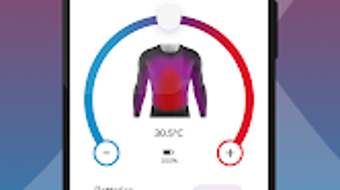
- Manual Heat Adjustment: Users retain full control over heating levels, allowing for real-time modifications based on changing environmental conditions or personal preference.
- Personal Dashboard: The app provides a centralized view of activity data, including the number of Heat Waves, duration of sessions, and battery consumption.
- Cloud-Based Settings: User preferences are stored online, ensuring seamless transitions between devices without data loss.
- Multi-Language Support: Available in English and French, with plans to expand to additional languages in the future.
These features collectively support efficient thermal regulation, particularly during prolonged outdoor exposure. For instance, a skier can maintain consistent warmth without manual intervention, while a hiker can adjust heat levels during rest breaks. The dashboard offers insights into usage patterns, promoting awareness of energy consumption and thermal response over time.
User Interface, Workflow & Performance
The user interface of clim8 is designed for intuitive navigation, focusing on clarity and ease of access to core functions. Key controls such as heat level adjustment and dashboard access are prominently displayed, minimizing the need for complex menu interactions. The workflow begins with pairing the device via Bluetooth, followed by automatic calibration and profile setup.
Once configured, users can monitor real-time temperature data and adjust settings with minimal input. The app maintains a responsive interface, though exact performance details were not specified by the developer. No information was provided regarding CPU or RAM usage, nor were there details on long-term stability or background behavior.
The developer did not specify resource usage details, so users should expect general performance patterns typical of lightweight mobile applications. Battery impact during active use was not disclosed, but given the app’s reliance on Bluetooth and continuous monitoring, moderate energy consumption is expected. Overall, the workflow emphasizes simplicity and user control, aligning with the app’s lifestyle-focused purpose.
Compatibility & System Requirements
clim8 is available exclusively for Android devices and was released on March 1, 2023. The app has a file size of 15.2 MB, which is relatively compact for a feature-rich lifestyle application. Compatibility information is limited to Android, with no details provided on minimum OS version, screen resolution, or hardware specifications.
The developer did not specify exact system requirements, so users should ensure their device supports Bluetooth 4.0 or higher and has sufficient storage space for the app and its data. The app is designed to work with wearable products equipped with clim8 technology, which are not included in the software package. Platform compatibility information is partially provided, and users are advised to verify device compatibility with the manufacturer’s specifications before installation.
Pros and Cons
Pros
- Free to download and use, making it accessible to a wide audience.
- Personalized thermal profile creation enhances user comfort and adaptability.
- Automatic calibration simplifies setup and improves usability.
- Cloud-based settings allow seamless device switching.
- Supports multiple languages with plans for expansion.
- Intuitive interface focused on essential controls.
Cons
- Exclusive to Android; no support for iOS or other platforms.
- Exact system requirements were not listed.
- Performance and resource usage details were not provided.
- Requires compatible wearable hardware to function fully.
- Language options are currently limited to English and French.
FAQ Section
Is clim8 available for iOS devices?
As of now, clim8 is only available for Android users. There is no official iOS version announced.
Is the app safe to use with wearable heating products?
Yes, clim8 is designed to work securely with products equipped with clim8 technology. The app uses Bluetooth for communication, which is a standard and secure protocol for such devices.
How often does the app update?
Update frequency is not specified by the developer. Users should check the Google Play Store for the latest version.
Does clim8 require an internet connection?
The app functions primarily through Bluetooth for device pairing and control. While some features like cloud-based settings require internet access, core functionality operates offline.
Can I use clim8 without a wearable product?
clim8 is designed to work in conjunction with wearable products that support clim8 technology. It cannot operate independently without compatible hardware.
Final Thoughts
clim8 presents a compelling solution for outdoor enthusiasts seeking personalized thermal comfort through smart heating technology. Its ability to create a custom thermal profile and adapt heating output based on real-time body temperature makes it a valuable tool for hikers, skiers, and casual walkers. The intuitive interface, cloud-based settings, and automatic calibration streamline the user experience.
While platform exclusivity to Android and limited system requirements may restrict accessibility, the app’s focus on usability and innovation stands out. With recognition from prestigious events and a growing feature set, clim8 demonstrates strong potential in the wearable tech space. For users invested in smart apparel and outdoor safety, this lifestyle app offers a practical and forward-thinking approach to thermal management.
Download clim8 now.







